It is possible to also reference DLLs instead of NuGet packages. Change the .nupkg extension of the packages to .zip, unzip them, and extract the DLL files. Then uninstall the NuGet packages from each project and replace them with DLL references.
Tuesday, December 22, 2020

Tuesday, December 15, 2020
Group Policy: So You Want To Know What the Sys Admins Did To You
How to See Which Group Policies Are Applied to Your PC and User Account
rsop.msc
(Resultant Set of Policy)
Takes a while to render when you try to expand.
For more: https://www.howtogeek.com/116184/how-to-see-which-group-policies-are-applied-to-your-pc-and-user-account/
For Remote Desktop timeout info:
Computer Configuration → Administrative Templates → Windows Components → Remote Desktop Services → Remote Desktop Session Host → Session Time Limit.
To Edit Group Policy:
gpedit.msc
Create Database Project in Visual Studio 2017


Here's where you can get a Connection String if you want for later:


It is selectable!

Some options:

Click START.... and....


Click Finish

Friday, November 13, 2020
Visual Studio 2015 Install: 32-bit vs 64-bit, x86 vs x64
As of this writing, when you go to Visual Studio downloads, you will be presented with either the x86 or the x64, as well as either the EXE or the DVD (an ISO file).
What to do? We know that even though all machines are 64-bit these days, Visual Studio as of 2015 wasn't really 64-bit ready and proven. There's a lot of projects in VS2015 that were written on 32-bit machines, too.
Turns out, whether you select x86 or x84, both the EXE and the ISO will download the EXACT SAME FILE. The filename has both x86 and x64 in the title.
So don't sweat the choice.
Thursday, November 12, 2020
SQL Server: How to find port and instance
If the default 443 ain't working for you....
1. Open SQL Server Configuration Manager
2. Network Configuration section (you'll also see the INSTANCE names here). Select instance name.
3. It reveals the PROTOCOLS list. Right click on TCP/IP and select PROPERTIES.
4. Click on the tab "IP Addresses" and SCROLL DOWN to the IP All group.
5. The value in TCP Dynamic Ports is what you want.
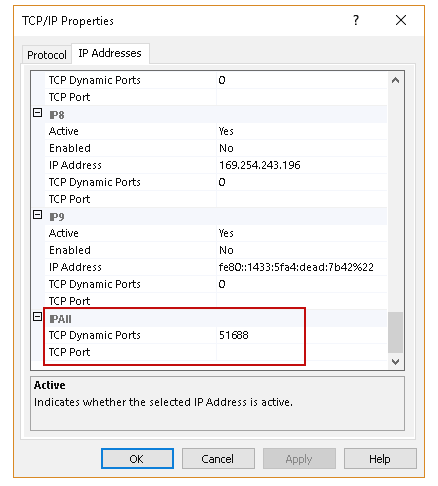
Thursday, November 5, 2020
packages.config vs PackageReference
https://docs.microsoft.com/en-us/nuget/consume-packages/migrate-packages-config-to-package-reference
Visual Studio 2017 Version 15.7 and later supports migrating a project from the packages.config management format to the PackageReference format.
Beware the global.json file
If you are trying to get a .NET Core project to build, beware that if you have a global.json file in your user folder, it might be overriding any other settings.
Warning signs are yellow exclamation mark icons in your References and Dependencies, including NuGet (because if you don't have the right SDK you can't get far enough to start updating references).
"The current .NET SDK does not support targeting .NET Core 2.1. Either target .NET Core 1.1 or lower, or use a version of the .NET SDK that supports .NET Core 2.1".
probably could also be any combination.....
"The current .NET SDK does not support targeting .NET Core 2.2. Either target .NET Core 2.1 or lower, or use a version of the .NET SDK that supports .NET Core 2.2".
"The current .NET SDK does not support targeting .NET Core 2.3. Either target .NET Core 2.2 or lower, or use a version of the .NET SDK that supports .NET Core 2.3".
File:
MicrosoftNET.TargetFramework
Line 112
Subscribe to:
Posts (Atom)