Showing posts with label sql. Show all posts

Saturday, December 26, 2020

T-SQL Transaction Most Basic Example

 BEGIN TRY

                BEGIN TRANSACTION

                                DECLARE @newID INT;


                                --For testing, bad SQL goes here:

                                --INSERT INTO Intake(intake_id, name, pet) VALUES (39,'Ape', 'Dog')


                                --Good SQL goes here:


                                    INSERT INTO Intake(res_name) VALUE("joe");


                                SET @newID =scope_identity();


                                INSERT INTO Intake_ISC_lutb(Intake_ID, ISC_Guid)VALUES(@newID, 'Smedly')


                COMMIT TRAN

END TRY

BEGIN CATCH

                IF @@TRANCOUNT > 0

                                ROLLBACK TRAN

                                --RAISERROR('Error raised in Intake', 16,1)

END CATCH


Wednesday, January 15, 2020

T-SQL LOOPS

Aint no for...loops in T-SQL, so you can use something like:

DECLARE @cnt INT = 0;
WHILE @cnt < 10
BEGIN
   PRINT 'Inside simulated FOR LOOP';
   SET @cnt = @cnt + 1;
END;

PRINT 'Done simulated FOR LOOP';

--------------------------------------------------------------------------------
Practical example to create a reporting hierarchy for an org chart:

DECLARE @userid NVARCHAR(10) = 'A1234'
WHILE @userid is not null
    BEGIN
         select * from tblUsers where userId = @userid
         set @userid  = (select supervisorsUserId from tblUsers where userId = @userid )
    END

-------------------------------------------------------------------------------
Another example, using PRINT and multiple variables:

DECLARE @UserId NVARCHAR(10) = 'A1234',
 @FirstName NVARCHAR(max),
 @LastName NVARCHAR(max);

WHILE @UserId is not null
    BEGIN
         select @FirstName=FirstName, @LastName=LastName
         from tblUsers where UserId = @UserId
         PRINT @FirstName + ' ' + @LastName + ' reports to '
         set @UserId  = (select SupervisorsUserId from tblUsers where UserId = @UserId )
    END


=============================================
You can nest BEGIN...END's!!
=============================================

If you need to insert a "break" (like an "exit"), here's how:

BEGIN

 -- do stuff
--- would cause an infinite loop if not caught!!
IF EXISTS (select userID from tblUsers where SupervisorsUserId = @UserId)
BEGIN
     BREAK;
END


END

Friday, June 21, 2019

Thursday, October 5, 2017

Difference Between DBNull.Value and Null Reference

Let's say you are looking up some numerical value in a table, based on some id, like a PRODUCT ID, for example, the PRICE. 

If the table allows nulls for the PRICE (and in the real world, sometimes this happens, out of your control), then it is possible that there is a PRODUCT ID in the table that has a NULL price.  If you do a query in SQL Server Mgt Studio, you'll actually see it say in the cell, NULL.

On the other hand, let's say that the PRODUCT ID is erroneous, that is, it does not exist in the table.  So a query for the price would return no rows.

If you are using ExecuteScalar(), then you have two possible types of null situations to consider.

In the former situation, ExecuteScalar() would return an object which has the value of DBNull.Value.
In the latter, it would return null.


Example:
object returnValue = cmd.ExecuteScalar();
if(returnValue == DBNull.Value){
//table allows nulls for this field
}

if(returnValue == null) {
// no records were returned
}


if(returnValue != null && returnValue != DBNull.Value){
     double price = (double)returnValue;
}

Sunday, July 23, 2017

Generic all-purpose HTML table from SQL reader (Version 2.0)

            string output = "";
            int debugColnumber = 0;
            int debugRecordnumber = 0;

                               
            using (SqlConnection cn = new SqlConnection(DBConnection.getDBConnection()))
            {
                SqlCommand cmd = new SqlCommand(sql, cn);
                cmd.CommandType = System.Data.CommandType.Text;


                try
                {
                   
                    cn.Open();
                    SqlDataReader reader = cmd.ExecuteReader();

                    var columns = new List<string>();
                 

                    output =  "<table><tr>";
                    for (int i = 0; i < reader.FieldCount; i++)
                    {
                        columns.Add(reader.GetName(i));
                        output += "<th>" + reader.GetName(i) + "</th>";
                    }
                    output += "</tr>";
                   
                    while (reader.Read())
                    {
                        debugRecordnumber++;
                     
                        output += "<tr>";
                        for (int i = 0; i < reader.FieldCount; i++)
                        {
                            debugColnumber++;
                            var dotNetType = reader.GetFieldType(i).Name;
                            var sqlType = reader.GetDataTypeName(i);
                            var myType = reader.GetType().ToString();

                           
                            if (reader.IsDBNull(i))
                            {
                                output += "<td></td>";
                            }
                            else
                            {
                               
                                switch (reader.GetFieldType(i).Name)
                                {
                                    case "Boolean":
                                        output += "<td>" + reader.GetBoolean(i).ToString() + "</td>";
                                        break;
                                    case "String":
                                        output += "<td>" + reader.GetString(i) + "</td>";
                                        break;
                                    case "Double":
                                        output += "<td>" + reader.GetDouble(i).ToString() + "</td>";
                                        break;
                                    case "Decimal":
                                        output += "<td>" + reader.GetDecimal(i).ToString() + "</td>";
                                        break;
                                    case "Date":
                                        //todo
                                        break;
                                    case "int":
                                        //todo
                                        break;
                                    default:
                                        output += "<td>" + reader.GetFieldType(i).Name + "</td>";
                                        break;
                                }
                            }
                           
                        }
                        output += "</tr>";

                     
                    }
                    output += "</table>";

Tuesday, November 29, 2016

Temp Tables

Remember, you don't have to create structure of temp table....


select deptName, deptId, count(*) as TotalEmp
into #TempEmpCount
from tblEmp join tblDept on tblEmp.DeptId = tblDept.DeptId
group by DeptName, DeptId


select DeptName, TotEmp
from #TempEmpCount
where TotalEmp >= 2

Drop Table #TempEmpCount

=====
Dropping is a "good practice"

Temp tables are stored in TempDB.
SCOPE: local only for current session, can be shared b/w nested sp calls.  Global are visible to other sessions and are destroyed when last connection referencing the table is closed.


=====

If you want to have a specific structure, use TABLE VARIABLE:

Declare @tblEmpCount table(DeptName nvarchar(20), DeptId int, TotalEmp int)

Insert @tblEmpCount
select DeptName, DeptId, Count(*) as TotalEmp from tblEmp......

Select DeptName, TotalEmp
from @tblEmpCount

====
NOTE: You don't have to drop table variables. And you can pass table variables as parameters between procedures.
===========

DERIVED TABLES:

select DeptName, TotEmp
from (
Select DeptName, DeptId, COUNT(*) as TotEmp
from tblEmp
join tblDept......
)  as EmpCount
where TotalEmp >= 2


==========
New in SQL SERVER 2005: CTE (Common Table Expressions)
Similar to derived table....

With EmpCount(DeptName, DeptId, TotEmp)
as (
Select DeptName, DeptId, COUNT(*) as TotEmp
from tblEmp
join tblDept...
)
Select DeptName, TotEmp
from EmpCount
where TotEmp >=2


Monday, August 8, 2016

Clustered Index

a CLUSTERED index determines the PHYSICAL location (order) of data in a table. That's why you can only have ONE clustered index per table.


A Primary Key constraints will automatically create a CLUSTERED INDEX on that column.

-can have multiple columns (a COMPOSITE index)


Execute sp_helpindex tblEmployee
to view indexes.


You can change clustered index.  First:

Drop Index tblEmployee.PK_tblEmplo_3FD45DG   (or might have to use Object Explorer to Delete)

Create Clustered Index tblEmployee_Gender_Salary on tblEmployee (Gender DESC, Salary ASC)


CLUSTERED includes Data: think PHONEBOOK
NON-CLUSTERED is separate from data: think index to a BOOK

Since the index is stored separately, you CAN have MORE THAN ONE non-clustered indexes per table.

CLUSTERED INDEX is faster because it involves a single lookup, whereas NON-CLUSTERED has to do a second step to access the data location.  Also, NON-CLUSTERED requires EXTRA STORAGE SPACE for itself.

----
set statistics io on

(then write your select query)

After running, view Messages.

----

For viewing execution plan,
TABLE SCAN is when there isn't an index.
An INDEX SEEK would be more efficient.


----

Downside of Indexing is when you have lots of writes/updates (transactions) to a table.

-----
Naming conventions:
IX prefix means Index.
UIX means UNIQUE index.


Thursday, March 10, 2016

Row Numbering, Paging with SQL Server 2005+

@"with userUsers as
(
SELECT ROW_NUMBER() OVER(ORDER BY EMAIL ASC) AS 'RowNumber', a.*, b.certs
FROM [dbo].[User] a left join [dbo].[Completed] b on a.UserId = b.UserId
where a.productId = @productId and a.osname=@oname
) select * from userUsers where
RowNumber>" + ((page - 1) * pageSize) + " and RowNumber<=" + (page * pageSize)


Friday, September 26, 2014

SQL Joins


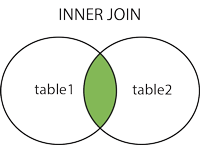
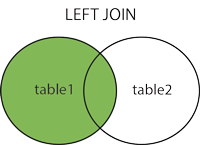
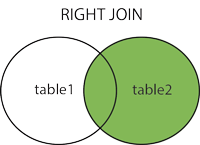
W3Schools has a great SQL section.  Included are:


The "outer" joins come in two flavors.  And now you can see why it doesn't make sense to have Left and Right INNER joins.


Getting To Know That DB You Inherited (SQL Server)

Useful SQL queries to get to know that legacy db you are assigned:

select t.name, count(t.name)'count'
from sys.columns col
inner join sys.tables tab on col.object_id = tab.object_id
INNER JOIN sys.types t ON col.user_type_id = t.user_type_id
group by t.name
order by 'count' desc

name count
datetime 36
int 32
char 32
decimal 24
varchar 19
sysname 1
varbinary 1

Actually, turns out the sysdiagrams table will mess up your numbers. Mostly you'll get an extra sysname and varbinary (and 3 extra int values).  So if you are using it to see which kind of types you have to contend with (as I was doing), know you can ignore those.

Also see:
http://itperfecting.blogspot.com/2007/06/t-sql-searching-through-schema.html

Tuesday, August 6, 2013

SQL Totals


SELECT DISTINCT sales_type, COUNT( sales_type) FROM orders GROUP BY sales_type

Gives result:

sales_type          COUNT(sales_type)
----------------  ---------------------
AMEX                 34
MSTRC             123
VISA                   23
ZCASH                 2

Tuesday, September 18, 2012

Oracle Schema

Quick way to generate your own schema:
select a.table_name,b.column_name, a.owner,a.tablespace_name
from all_all_tables a
inner join all_tab_columns b
on a.table_name = b.table_name

Friday, June 22, 2012

The worm turns: Embedded SQL vs Stored Procs

Written by James Kovacs about 5 years ago.
Historically Microsoft recommended stored procs because they gave much better performance. Query optimizers in SQL Server 2000 and 2005 have improved dramatically and this is no longer much of an issue. The biggest hassle with stored procs is you have two places to maintain and version code — namely your application and the database. Versioning is much more painful because even without database schema changes, you need the correct set of stored procs for the code base that is running against them. When you’re pulling apart the result set, you need to compare the columns in the stored proc select statements against the columns that your DataReaders are expecting. A trivial task, but mind-numbingly boring. It’s easier if the select is in close proximity to the code that parses it. Personally I’m a big fan of having an ORM tool such as NHibernate or LINQ generate the dynamic queries for me and perform the parsing. I honestly think that’s the way of the future and hand-optimized stored procs will be used for perf critical operations when needed.
And Microsoft doesn't provide a good way of organizing and managing Stored Procedures into folders.

Monday, October 18, 2010

INSERT with SELECT

The syntax for inserting a new row (or record) into a table using data from a select is not very intuitive.

The INSERT syntax is:
INSERT tblFred(field1, field2, field3) VALUES( 'ape', 436, 0)
or if you are insert values for all columns in order:
INSERT tblFRED VALUES (23, 'ape', 436, 0)

But to use the INSERT with a SELECT, you omit the VALUES( ) phrase:
INSERT tblFred(field1, field2, field3) SELECT fieldA, fieldB, fieldC FROM tblSmedly

or
INSERT tblFred SELECT * FROM tblSmedly

Friday, October 15, 2010

Which edition of SQL Server 2005 is that?

SELECT SERVERPROPERTY('productversion'), SERVERPROPERTY ('productlevel'), SERVERPROPERTY ('edition')

Tuesday, October 12, 2010

UNIX Date Format for SQL Server

UNIX date times are most often stored as seconds from midnight, January 1, 1970. If you are running into a date format that looks like, for example, "1286790650" or "1141541097", a ten digit number, it is most likely a UNIX time stamp. (also see http://en.wikipedia.org/wiki/Unix_time ).

Here's how to convert on SQL Server:
dateadd(ss, 1234567890, '1970-01-01')
where 12345678790 is your date given in UNIX time stamp format.

This is also why 11:31 pm (in the UK) was so exciting on February 13, 2009.

Friday, September 10, 2010

Mungled SQL Server instances

So, you have before you a box that has seen its share of SQL Server instances over the years, had its security settings and various broadcast settings changed inconsistently, and you just want to get a handle on what you have. To get the instance names, do a search for the "perf-*.ini" files in the various database folders (i.e., "MSSQL.1").

For example, in:
C:\Program Files\Microsoft SQL Server\MSSQL.1\Binn
if the instance used for this database was "SMEDLY" then you'll find:
"perf-SMEDLYsqlctr.ini"

Tuesday, August 3, 2010

Installing SQL Server 2005: Collation

I had to make sure I had the collation settings set exactly as they were in a production instance of SQL Server. In the past, SQL Server gave you a single list of collation settings - code orders to pick from. I think the default was:

"SQL_Latin1_General_Cp1_CI_AI" ("sort order id" 54).

But since SQL Server 2005, the preferred way to set collation is now modular: you first select a "Collation designator" (i.e., alphabet) and then specify the "sort order" by selecting from various checkboxes:

  • binary
  • case-sensitve
  • accent-sensitive
  • binary-code point
  • kana sensitive
  • width-sensitive

So I had to figure out what the old collation setting string (in my case, "SQL Latin1_Cp1_CI_AS") meant, in this regard. As is kind of obvious, it contains the sort order settings as abbreviations. But just to make sure:

Code Page
Specifies a one- to four-digit number that identifies the code page used by the collation. CP1 specifies code page 1252, for all other code pages the complete code page number is specified. For example, CP1251 specifies code page 1251 and CP850 specifies code page 850.

Case Sensitivity

CI specifies case-insensitive, CS specifies case-sensitive.

Accent Sensitivity

AI specifies accent-insensitive, AS specifies accent-sensitive.

Tuesday, March 16, 2010

Database DE-normalization and Violating Simplicity Principles

Timothy Claason, at SQL Server Central, writes:

"Denormalization is not a design strategy. It is a design work-around. Well normalized databases represent a good design strategy, but can often lead to a great deal of complexity when it comes to support, maintenance, and new development. A well designed database can mean that, in order to get specific data you need, you need to go through 5, 10, or even more tables which represent the data you're looking for. Though there are many solutions to this dilemma,such as virtual tables (views), programmatic solutions, temporary tables, and more, I think it's important to not discount the value of well-placed denormalization in the database. The intent of this article is to consider some use cases for denormalization, and from those use cases, assert some generalizations about when and why to use denormalization."


Continued

Tuesday, April 1, 2008

SQL for Running Totals: The Power of Cross Join


SELECT
t.transaction_date, t.amount, t.[description], sum (t2.amount) as RunningTotal
FROM
cash_transaction_table t
CROSS JOIN cash_transaction_table t2
WHERE
(t2.transaction_date <= t.transaction_date)
GROUP BY
t.transaction_date,
t.amount,
t.[description]
ORDER BY
t.transaction_date